Ready-made skills for Claude
6 free ready-made skills for Claude: accounts receivable, sales report, pipeline forecast, stock and reorder, forgotten customers, POS shifts. Free for everyone. Install steps and safety rules — SBT Consulting and Solutions.
Free — for everyone
All skills are completely free: no sign-up, no payment, and you do not even need to be an SBT CRM customer.
A skill is an instruction package that makes Claude do a job the same way every time. Download the skills below for free, install them in Claude and get your reports with one request.
Available skills
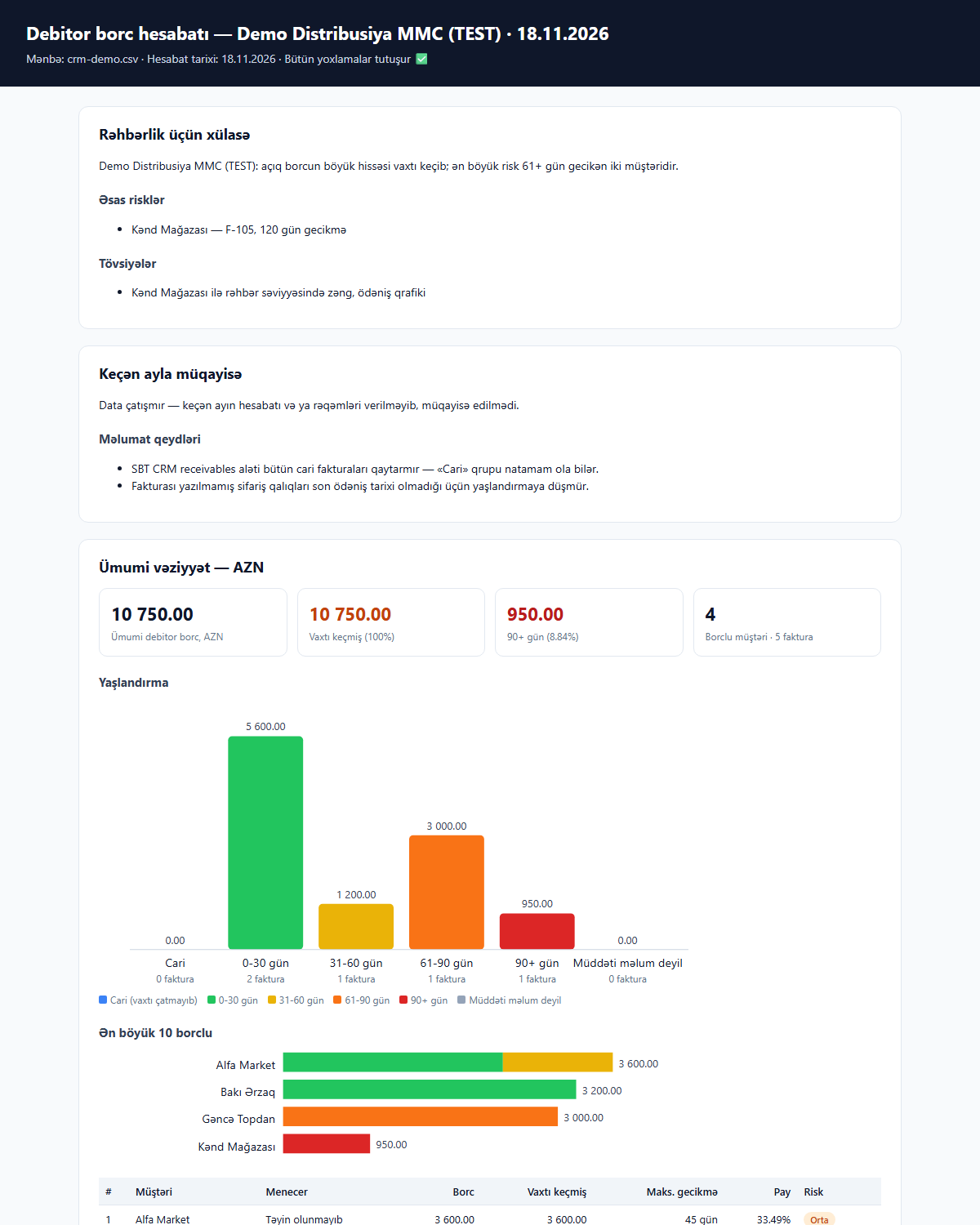
Accounts receivable report (debitor-borc-hesabati) — Free — for everyone
What it does
- Ages receivables: 0-30 / 31-60 / 61-90 / 90+ days.
- Shows the largest debtors and reconciles the totals; currencies are kept separate.
- Builds a call list per manager and a short summary for management.
- Drafts payment reminders to customers — it never sends anything.
- Flags data problems (duplicates, empty dates, negative amounts) separately.
Who it is for
- Sales and finance managers, accountants, owners — anyone who prepares the receivables report by hand every month.
- Connection to SBT CRM: Business plan and above. The report is built straight from CRM data and is also saved on the «🧠 Claude» page.
- Works without a CRM too: attach an Excel, CSV or 1C export to the chat.
A charted HTML report (opens in the browser, can be downloaded), a short text summary and reminder drafts.
⬇ Download debitor-borc-hesabati.zip
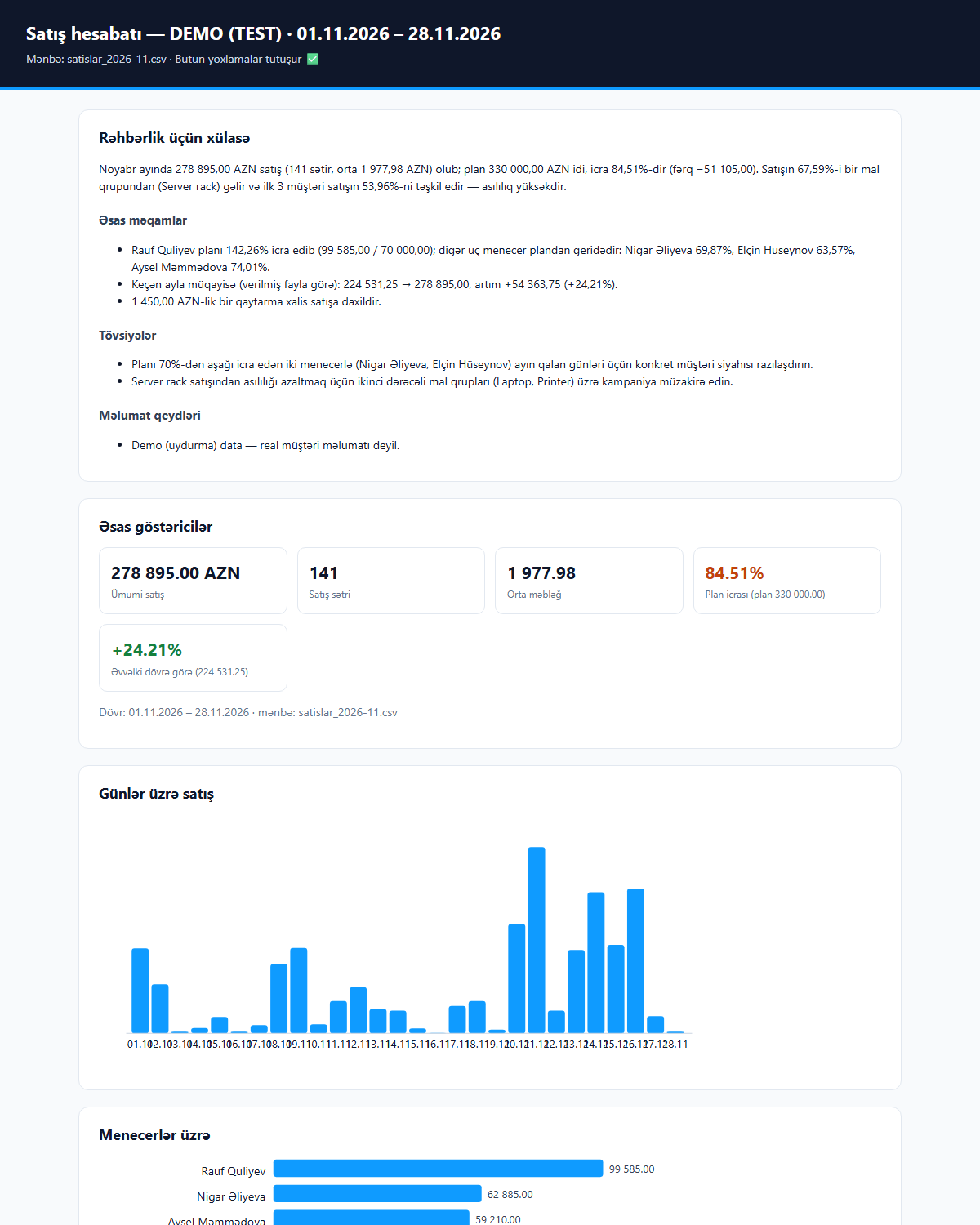
Sales report (satis-hesabati) — Free — for everyone
What it does
- Totals by manager, product and customer.
- Top and bottom products, largest customers.
- Plan vs actual per manager (when a plan is given).
- Month-over-month only when last month's data is provided.
- Totals are reconciled; says «data missing» instead of guessing.
Who it is for
- Sales heads, owners, accountants — anyone who compiles the monthly sales report by hand.
- Connection to SBT CRM: Business plan and above. The report is built straight from CRM data and is also saved on the «🧠 Claude» page.
- Works without a CRM too: attach an Excel, CSV or 1C export to the chat.
A charted HTML report with a short summary and recommendations; product and customer breakdowns need a CSV/Excel export (the CRM tool does not provide them).
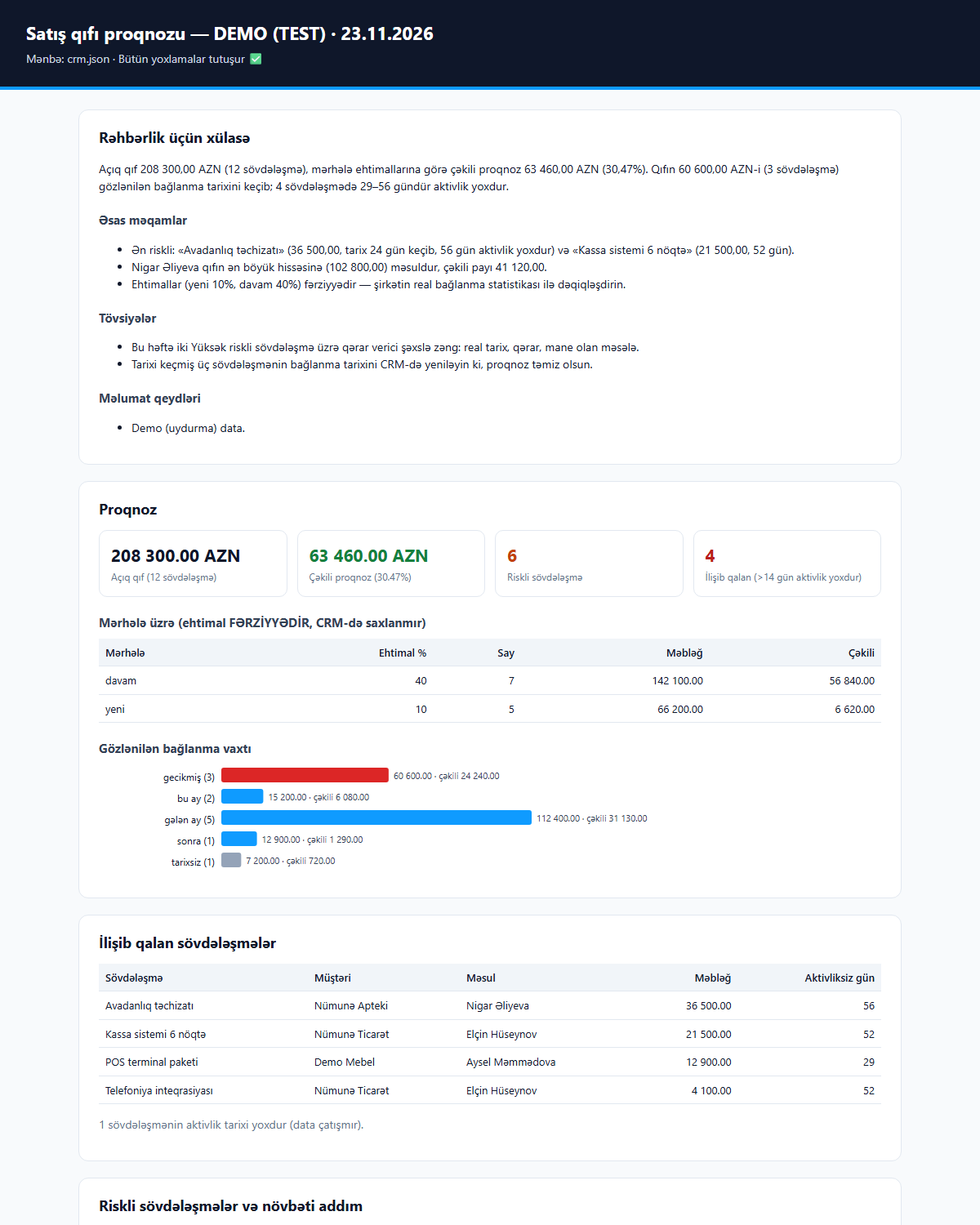
Sales pipeline forecast (satis-qifi-proqnozu) — Free — for everyone
What it does
- Weighted forecast by stage probability (assumptions shown openly).
- Stuck deals: no activity for N days.
- At-risk deals and deals past their expected close date.
- A suggested next step for every deal.
- Owner-level summary for managers; totals reconciled.
Who it is for
- Sales heads and managers — anyone asking «what will close this month?».
- Connection to SBT CRM: Business plan and above. The report is built straight from CRM data and is also saved on the «🧠 Claude» page.
- Works without a CRM too: attach an Excel, CSV or 1C export to the chat.
A charted HTML report: weighted forecast, stuck deals, at-risk deals and next steps.
⬇ Download satis-qifi-proqnozu.zip
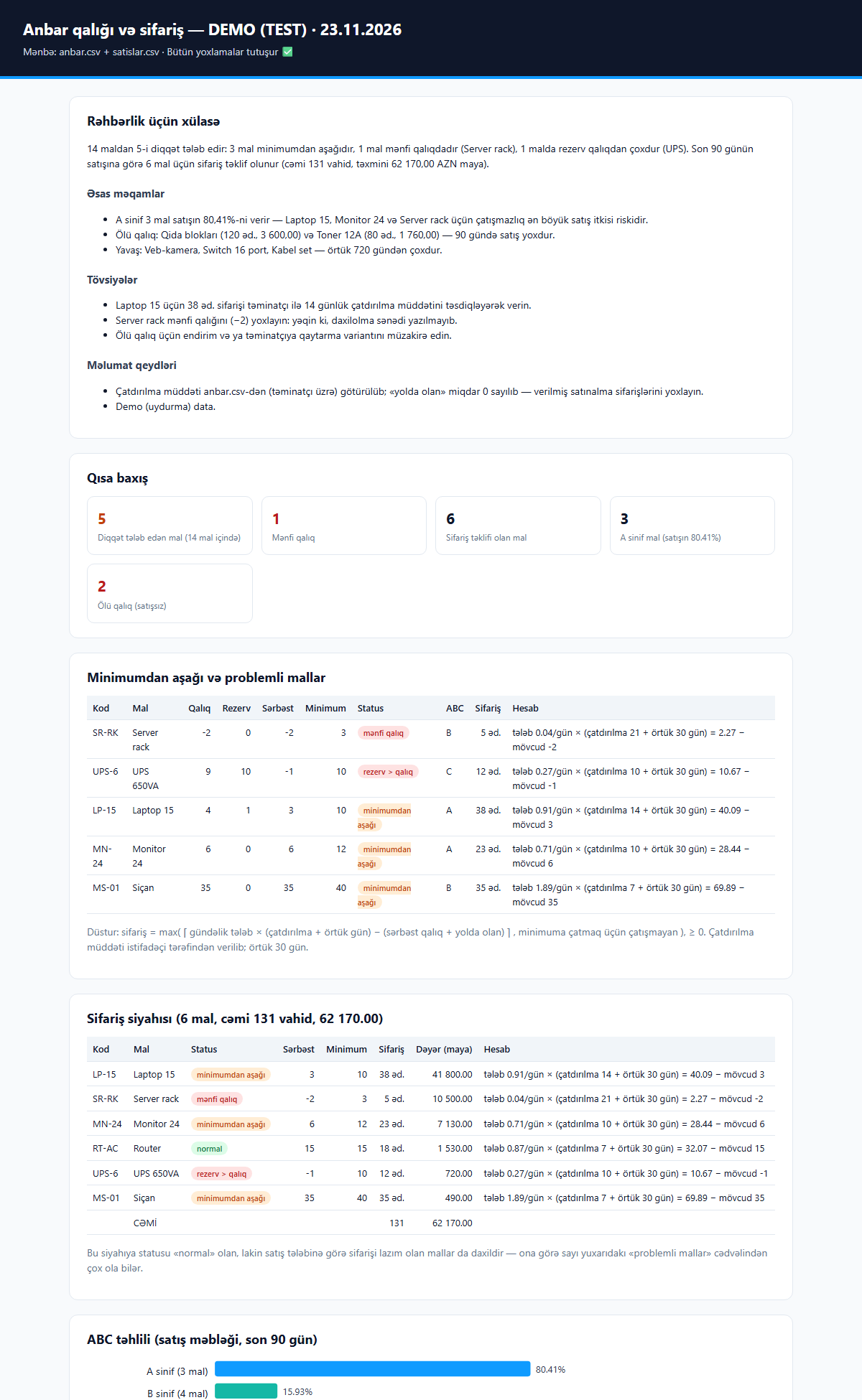
Stock and reorder (anbar-qaligi-sifaris) — Free — for everyone
What it does
- Items below minimum, with negative stock or over-reserved.
- Suggested order quantity — formula explained, lead time is your input.
- ABC analysis (80/15/5).
- Slow movers and dead stock, with value.
- Totals reconciled; «data missing» when there is no sales history.
Who it is for
- Warehouse, purchasing and sales heads — anyone who needs to know what to reorder and how much.
- Connection to SBT CRM: Business plan and above. The report is built straight from CRM data and is also saved on the «🧠 Claude» page.
- Works without a CRM too: attach an Excel, CSV or 1C export to the chat.
A charted HTML report: problem items, order suggestions, ABC and dead stock. Full ABC and dead stock need a stock and sales export.
⬇ Download anbar-qaligi-sifaris.zip
Forgotten customers (unudulmus-musteriler) — Free — for everyone
What it does
- Customers with no contact for N days.
- Prioritised call plan: value × days since contact.
- Segment summary: 30–59, 60–119, 120+ days.
- Personalised message drafts — never sent.
- Says «data missing» when contact date or value is unknown.
Who it is for
- Sales and customer-relations heads — anyone who wants to call at-risk customers in time.
- Connection to SBT CRM: Business plan and above. The report is built straight from CRM data and is also saved on the «🧠 Claude» page.
- Works without a CRM too: attach an Excel, CSV or 1C export to the chat.
A charted HTML report: call plan, segments and message drafts (AZ/EN/RU/TR).
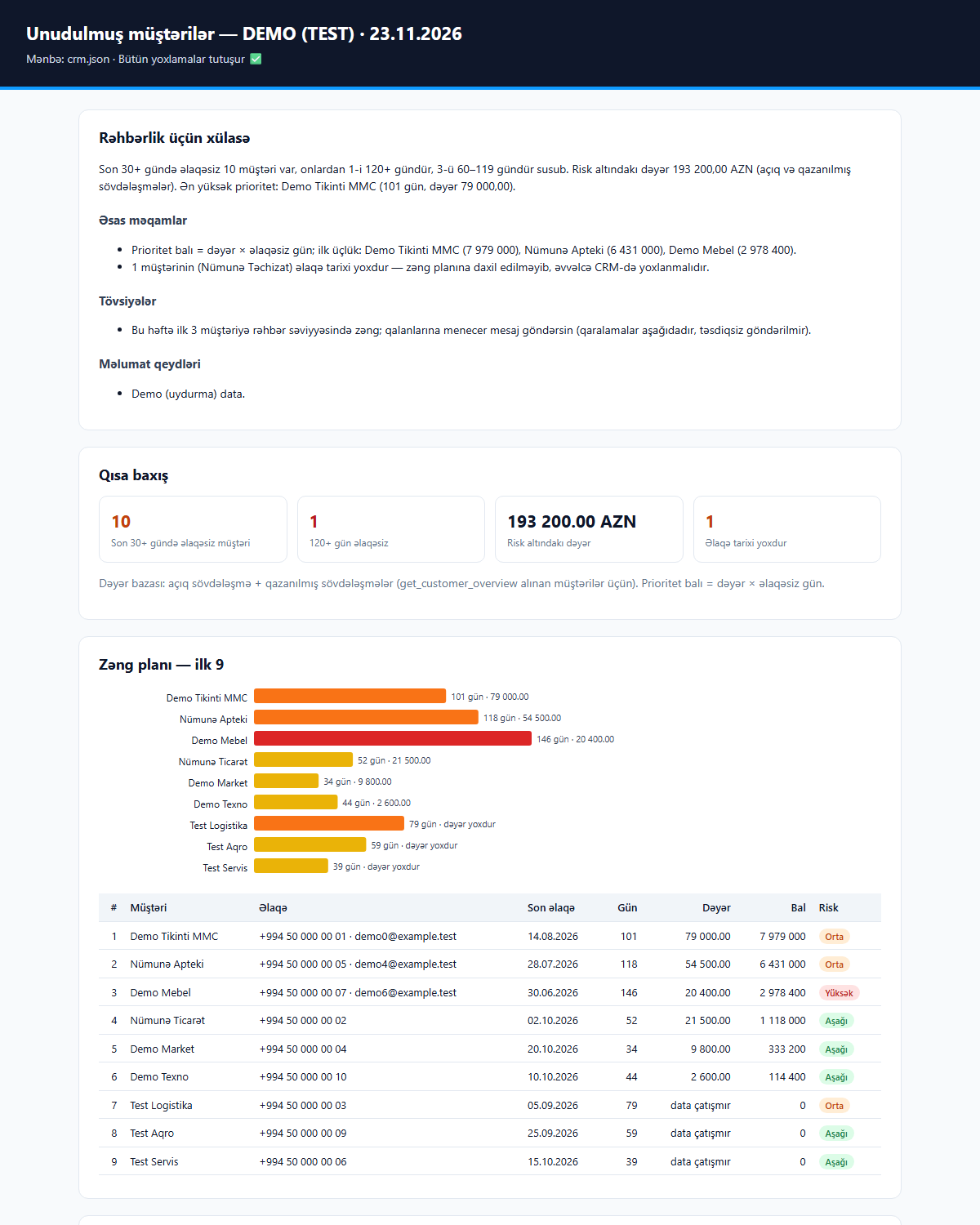
⬇ Download unudulmus-musteriler.zip
POS shifts (kassa-novbeleri) — Free — for everyone
What it does
- Z-report summary: sales, returns, net.
- Cash difference per shift and cashier (counted − expected).
- Returns and discount share, shifts left open.
- Anomalies and what to check — signals, not accusations.
- Numbers are reconciled with the shift totals.
Who it is for
- Store and cash-desk heads, accountants — anyone who controls the cash daily.
- Connection to SBT CRM: Business plan and above. The report is built straight from CRM data and is also saved on the «🧠 Claude» page.
- Works without a CRM too: attach an Excel, CSV or 1C export to the chat.
A charted HTML report: Z summary, cash differences and anomalies. Voided receipts do not come from the CRM tool («data missing»).
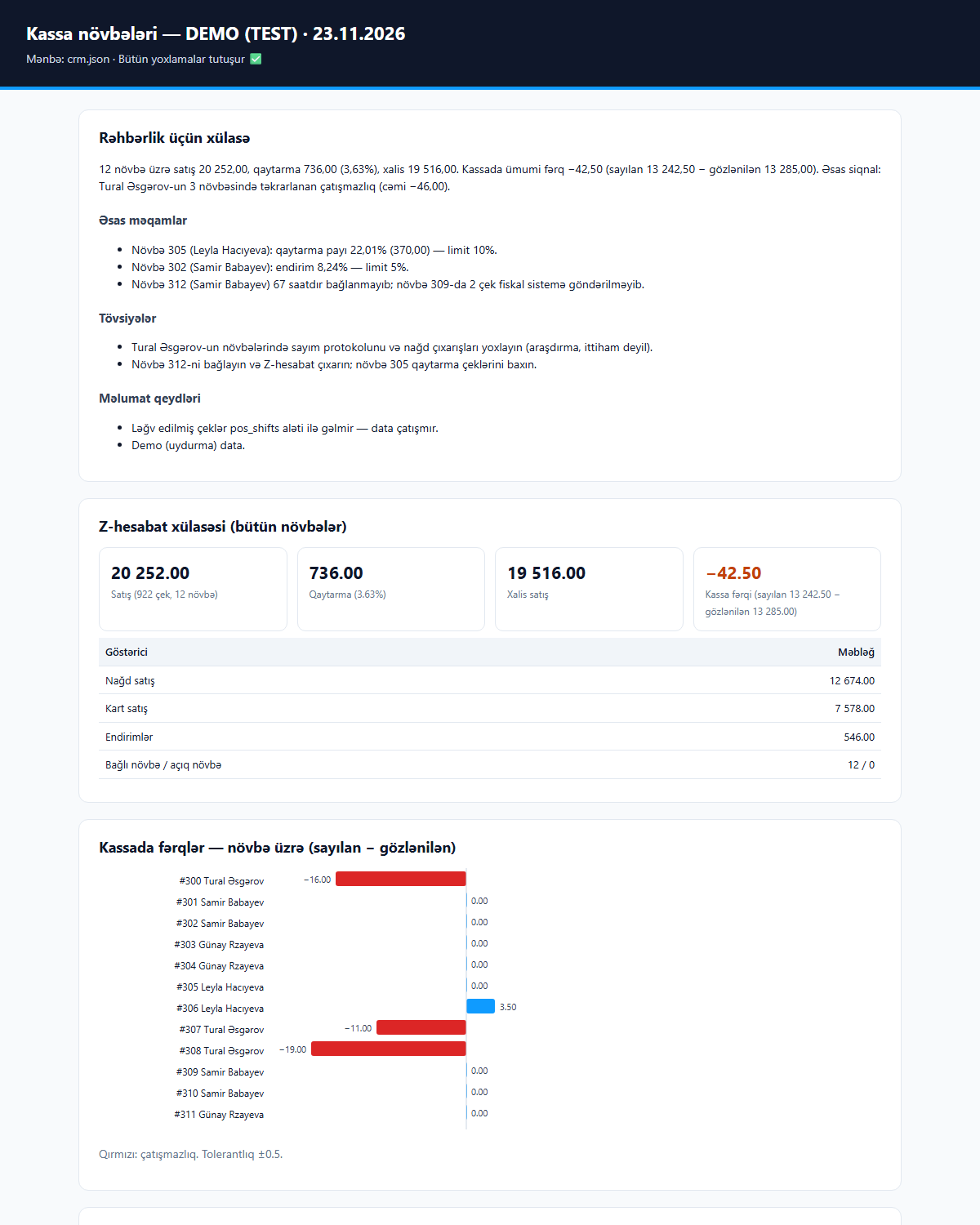
⬇ Download kassa-novbeleri.zip
Sample built from made-up demo data (not real customer data).
Installation — step by step
claude.ai (browser or app)
- Download the zip file with the button above. Do not unzip it — you upload it as it is.
- Open claude.ai → Customize → Skills (the Skills feature must be enabled for your account).
- Click the button to add a skill, choose the zip file and switch the skill on.
- In a new chat write: “Prepare an accounts receivable report” and attach the Excel/CSV/1C file. If SBT CRM is connected, no file is needed.
Claude Code
- Unzip it and put the debitor-borc-hesabati folder inside ~/.claude/skills/ (Windows: %USERPROFILE%\.claude\skills\). You should end up with ~/.claude/skills/debitor-borc-hesabati/SKILL.md.
- Restart Claude Code.
- Write: “Prepare an accounts receivable report” — Claude picks the skill itself.
Connecting SBT CRM (Business+)
In the CRM open Settings → «🧠 Claude connection», create the address and add it in Claude as a connector (Help → “Setting up Claude”). The skills then read data from the CRM tools themselves (receivables, sales_summary, list_deals, stock_alerts, customers_without_recent_contact, pos_shifts) and the report opens on the «🧠 Claude» page with the «📊 Open charted report» button.
Setup and training
WhatsApp for setup and training: +994 55 455 27 26
Safety
- Only install skills from trusted sources — ones you wrote yourself or got from a party you know.
- Before installing, look at the files inside, especially the script in the scripts/ folder.
- This skill sends nothing to customers: reminders are drafts only, and the decision to send is yours.
Read more: blog post — ask Claude for the same report every month